Aegil vs. Traditional Flutter
Traditional Flutter applications require substantial manual glue to communicate with backend databases, authentication systems, and state stores. Aegil re-architects this stack into an agent-driven full-stack system where declarative specifications produce fully synchronized server, client, and security layers with zero drift.
The Reality of Traditional Flutter Development
Section titled “The Reality of Traditional Flutter Development”If you build applications with traditional Flutter, your architecture typically looks like this:

Every new feature requires you to write and maintain at least 6 different files:
- Database migration SQL.
- Backend data model and ORM mapping.
- Server route and authorization logic.
- Client Data Transfer Object (DTO) with manual
fromJsonandtoJson. - Repository / API service handling HTTP calls, error codes, and headers.
- Client state management (BLoC/Cubit) handling loading, error, and cached items.
- Native manifest entries whenever hardware permissions are needed.
The Pain Points
Section titled “The Pain Points”- Silent Runtime Drift: If someone alters a database column on the server, the Flutter app compiles fine, but crashes in production when JSON parsing fails.
- Boilerplate Fatigue: More than 70% of full-stack code is repetitive CRUD plumbing and state management glue.
- Security Vulnerabilities: In the rush to connect Flutter to the backend, developers frequently pass
userIdorrolefrom the client, creating catastrophic privilege escalation holes.
Why AI Agents Break in Traditional Flutter Repos
Section titled “Why AI Agents Break in Traditional Flutter Repos”When you bring an autonomous AI coding agent (like Claude Code, Cursor, Windsurf, or Antigravity) into a traditional Flutter codebase, things quickly deteriorate:
| What the Agent Tries | Why It Fails in Traditional Flutter | How Aegil Fixes It |
|---|---|---|
| Add an API endpoint | The agent hallucinates route names, forgets backend session validation, and invents client-sent parameters (actingUserId). |
Zero-Trust by Construction: Endpoints never accept client-sent identities. auth.id and auth.role are derived strictly from the authenticated server session. |
| Update the database schema | The agent modifies existing migration files in-place or edits generated ORM classes directly, corrupting database state. | Hash-Locked Zone 3: All generated files in .aegil/ are cryptographically hash-locked. Agents physically cannot modify them (ERR_TAMPERED_GENERATED_FILE). |
| Manage Flutter state | The agent writes brittle HTTP request logic, invents inconsistent BLoC states, and forgets cache invalidation. | Generated Feature BLoCs: Aegil compiles reactive <Entity>Bloc classes with optimistic updates, cursor pagination, and WebSocket streams automatically. |
| Fix compilation errors | The agent gets stuck in infinite retry loops without structured feedback. | Self-Correction Loop: aegil verify --agent returns structured JSON error codes (ERR_*) with exact remediation steps. |
The Aegil Architecture: Agent-Driven & Full-Stack
Section titled “The Aegil Architecture: Agent-Driven & Full-Stack”In Aegil, you and your AI agent only write high-level declarations and custom business logic:
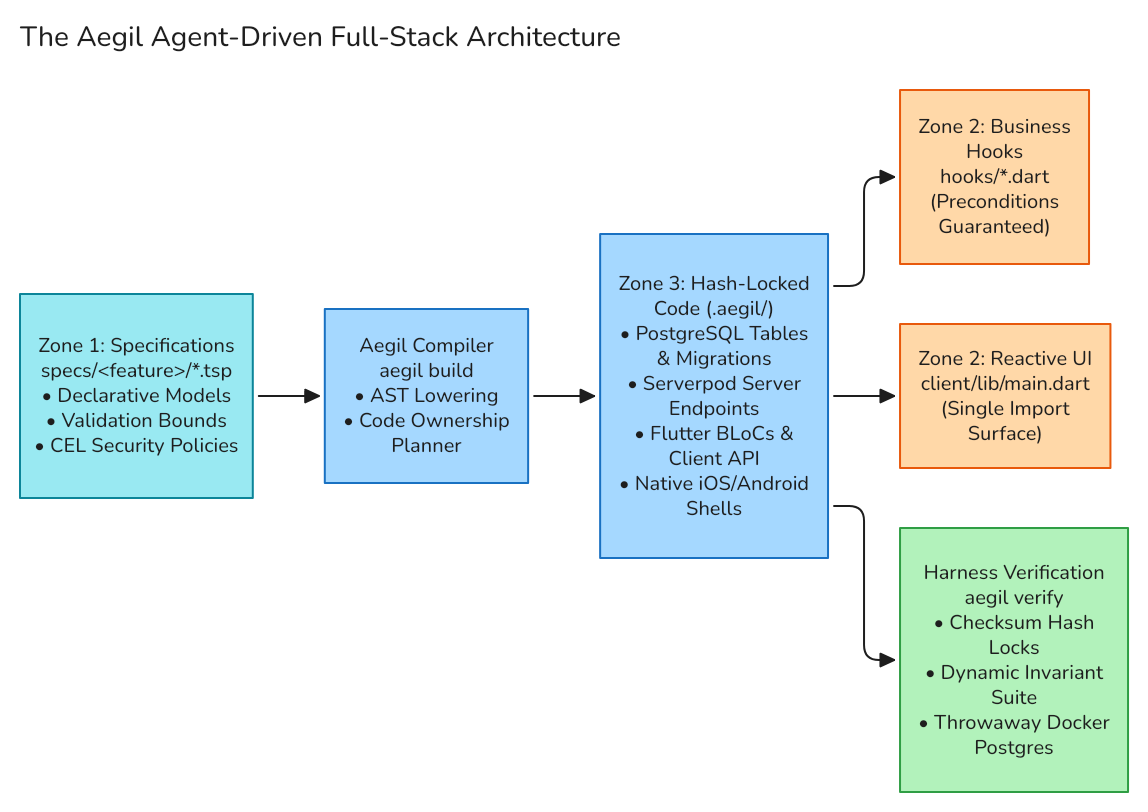
Direct Comparison: Traditional Flutter vs. Aegil
Section titled “Direct Comparison: Traditional Flutter vs. Aegil”| Capability | Traditional Flutter | Aegil Agent-Driven Framework |
|---|---|---|
| Source of Truth | Scattered across SQL, backend routes, Dart DTOs, and client services. | Single Source of Truth: One declarative TypeSpec file (specs/<feature>/*.tsp). |
| Backend & Database | Separate repository, disparate language (Node/Go/Python), manual ORM config. | Unified Serverpod Backend: Native Dart backend and PostgreSQL tables compiled in sync. |
| Client State Management | Hand-crafted BLoC/Cubit boilerplate, manual pagination, manual cache invalidation. | Generated Feature BLoCs: NoteBloc, TicketBloc with cursor pagination, loading states, and auto cache refresh. |
| Client Import Surface | Complex multi-package imports, generated model path soup. | Single Public Barrel: import 'package:<app>_flutter/api.dart'; exposes everything. |
| Zero-Trust Security | Manual, error-prone authorization checks on every endpoint. | Declarative CEL Policies: @policy compiles directly into PostgreSQL WHERE clauses. |
| Native Permissions | Manual edits to Info.plist, AndroidManifest.xml, macOS entitlements. |
Declarative Permissions: @permission("camera") in specs/platforms.tsp automatically injects native manifests. |
| Verification & Testing | Mock-heavy unit tests that drift from production reality. | Real Integration Suite: aegil verify runs end-to-end tests against throwaway PostgreSQL containers. |
| AI Agent Multiplier | Agents get lost, hallucinate routes, and tamper with generated code. | Agent-Native Harness: Machine Action Manifests, aegil context, and automated self-correction loops. |
Code Comparison: Adding a New Feature
Section titled “Code Comparison: Adding a New Feature”Consider adding a “Notes” feature with cursor-based pagination and create mutations.
Traditional Flutter Approach (300+ lines across 6 files)
Section titled “Traditional Flutter Approach (300+ lines across 6 files)”- Write raw SQL migration:
CREATE TABLE notes (...). - Write backend model, JSON parser, and REST endpoint handler.
- Write server-side authentication check:
if (session.user == null) return 401;. - Write Dart client DTO:
class Note { factory Note.fromJson(...) { ... } }. - Write HTTP client service:
http.get('/api/notes?cursor=' + cursor). - Write Flutter BLoC:
NoteEvent,NoteState,NoteBloc, handling loading spinners, error states, and appending pages.
Aegil Approach (20 lines in 1 file)
Section titled “Aegil Approach (20 lines in 1 file)”You or your AI agent write one declarative specification:
namespace Notes;
@entity({ table: "notes" })@policy({  read: "auth.id == self.ownerId",  write: "auth.id == self.ownerId"})model Note {  @pk  id: uuid;
  @validate({ minLength: 1, maxLength: 200 })  title: string;
  content: string;
  createdAt: utcDateTime;}
@autoQuery({ entity: "Note", paginate: "cursor", filterBy: [], sortBy: ["createdAt"] })op listNotes(limit?: int): Page<Note>;
@autoMutation({ entity: "Note", action: "create", touches: ["Note"] })op addNote(title: string, content: string): Note;
Then run:
aegil runAegil immediately:
- Creates the PostgreSQL table and migration.
- Boots the Serverpod backend with row-level security.
- Compiles the
NoteBlocwith cursor pagination and automatic cache invalidation (touches: ["Note"]). - Launches the Flutter client with hot reload.
In your Flutter UI, you consume the generated BLoC immediately:
import 'package:flutter/material.dart';import 'package:flutter_bloc/flutter_bloc.dart';import 'package:notes_flutter/api.dart';
Widget build(BuildContext context) {  return BlocBuilder<NoteBloc, NoteState>(    builder: (context, state) {      if (state.status == NoteLoadStatus.loading && state.items.isEmpty) {        return const CircularProgressIndicator();      }      return ListView.builder(        itemCount: state.items.length,        itemBuilder: (context, i) => ListTile(          title: Text(state.items[i].title),          subtitle: Text(state.items[i].content),        ),      );    },  );}
Next steps
Section titled “Next steps”- Build your first full-stack application in Quickstart (5 min).
- Understand code ownership in The Aegil Mental Model.
- Direct AI agents with The 3-Step Agent Protocol.
- Learn best practices in Effective Aegil.